

Deloop
Check the project here: https://github.com/nbaulib/deloopForm
Overview
I am a teacher and after every class/workshop I must fill out a Google form to describe how the class went.
The company I work for focuses on afterschool workshops so most instructors only need to fill out the form once per day they teach. I however, teach 6 classes on Friday as part of the schools regular day. As such, I must fill out the same form with near identical answers 6 times. Autofill takes care of my email, name, date but there are 8 other entries I must manually enter.
Automating this task will save at least 15 minutes of my day and will allow be to give more meaningful responses to the 1 entry that varies per class.
Task Description
Process Description
- Recieve message on Slack with link to Google Form
- Open Google Form
- Fill out entries
- Name
- School Site
- Workshop Name
- Date
- Course week completed
- Summary of topic covered
- Issues / Concerns
- Material Inventory
- Material Problem
- Reapeat step 2, five more times
- React with a thumbs up on slack
The link is the same each time so step one can be interchanged with other access point (?)
This task is performed on Friday, six times.
Problem Statement
Providing feedback after every class is is important but filling out multiple forms with similar information is tedious. The current process creates more friction and leads to rushed answers.
How might we automate the feedback process to reduce repetition and save time?
Automation Goal
- Reduce repetive input
- Allow for more energy on important entries
Inputs to the Task
Input Sources
- File OR
- Slack message
Input Formats
- JSON
Input Frequency
- One-time, periodic, event-driven, continuous, etc.
- 6 submissions every Friday
Outputs and End States
Outputs
- Submitted Google Forms
- Notification of success
Output Formats
- Slack message
- Screenshot of page
End State Conditions
- 6 confirmation page screenshots
Data Transformations
Transformation Steps
- Read txt file
- Parse: Seperate parts of file seperate submission
- Parse: Seperate submission part by individual entries/fields
- Validate: Make sure blank entries / “N/A” are standardized
- Map class number to full workshop title
- Add data to a JSON file
Transformation Examples
- Text file → Paragraph string → Sentence string → JSON
Input:
    1
    Week 10
    Very good summary of topic covered.
    Website restarted multiple times on Chromebook.
    N/A

    ---

    ...

    ---

    6
    week 9
    Very good summary of topic covered.
    Billy had a nosebleed.
    None
Output:
    [
    {
        "submission_id": 1,
        "workshop": "Game Design",
        "week": "Week 10",
        "summary": "Very good summary of topic covered.",
        "issues": "Website restarted multiple times on Chromebook.",
        "materials": "None",
    },
    ...
    {
        "submission_id": 6,
        "workshop": "Multiplayer Game Design",
        "week": ""Week 9",
        "summary": "Very good summary of topic covered.",
        "issues": "Billy had a nosebleed.",
        "materials": "None",
    }
    ]
Proposed Automation Approach
Techniques
- Scripting
- Input parsing
- Event trigger with Slack
Tools and Technologies
- Programming languages: Python
- Libraries/frameworks: Selenium
- External services/APIs: Slack Bot
- Operating system tools: Cron (?)
System Architecture
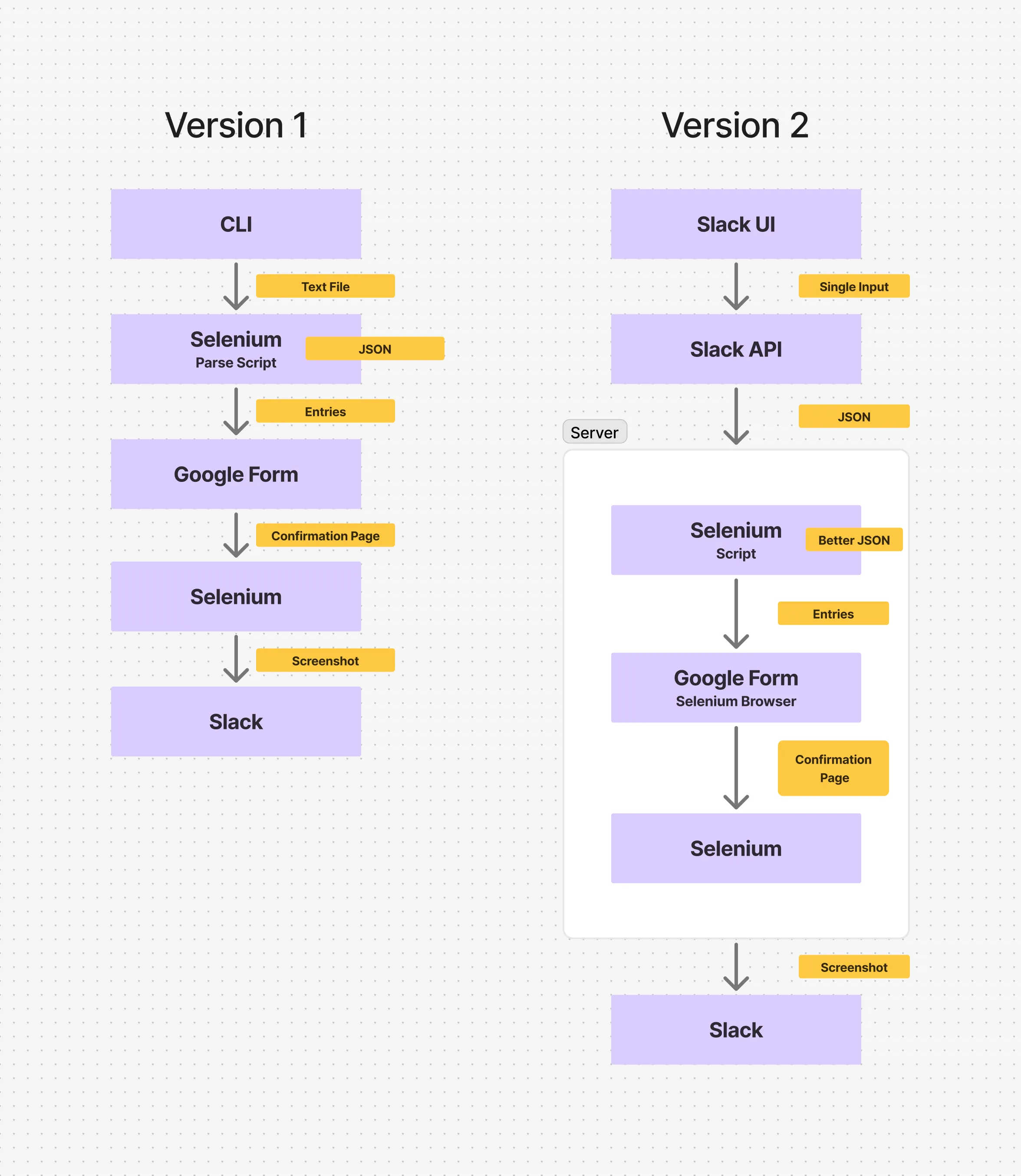
Pseudocode for Automated Task
Version 1:
BEGIN

LOAD Google form URL
LOAD input text file

PARSE input text file into submissionJSON
VALIDATE submissionJSON

OPEN browser

FOR each entry IN submissionJSON
    NAVIGATE to form URL

    FILL form fields:
        email
        name
        school site
        workshop name
        date
        course week
        summary
        issues
        inventory
        material problem

    SUBMIT form

    WAIT for confirmation page
    CAPTURE screenshot

END FOR

PRINT success notification

END
Version 2:
BEGIN

LISTEN for Slack event

IF new message received THEN

    LOAD Google form URL from Slack message
    LOAD input text from Slack message

    PARSE wanted Slack API JSON info into submissionJSON
    VALIDATE submissionJSON

    OPEN browser

    FOR each entry IN submissionJSON

        NAVIGATE to Google form URL

        FILL form fields:
            email
            name
            school site
            workshop name
            date
            course week
            summary
            issues
            inventory
            material problem

        SUBMIT form

        WAIT for confirmation page
        CAPTURE screenshot

        STORE result (success + screenshot)

    END FOR

    CLOSE browser

    SEND Slack message with:
        screenshots

END IF

END
Testing and Validation Plan
-
Test cases:
- Six submissions
- Missing submission
- Missing field
- Unordered field
- Incorrect field format
-
Expected vs. actual results:
-
Error handling strategies:
- Log errors
- Skip submission with missing fields with notification
- Ask user for more input if missing field
- Send message of what was input